My Full Stack Web Development Journey: Starting with How the Web Works 🌐

I'm Fahad Ali, currently perusing Computer Science student at FAST-NUCES. I started with UI/UX design, then moved into frontend development with HTML, CSS, and JavaScript. Now I’m learning the MERN stack to build real-world web apps. Next, I’ll explore DevOps to understand deployment and scaling, and later dive into AI/ML because it's the future. This blog is where I share everything I learn — step by step
Web development is not just about writing code. It's about understanding how the web actually works."
Introduction
Hi everyone! I'm Fahad, and I'm starting my journey to become a Full Stack Web Developer. Before jumping into coding, I decided to begin with the basics of how the internet works—a choice that has already changed my learning experience. 🧠 This blog is a summary of what I’ve learned and how it’s helping me build a solid foundation.T
his blog is a summary of what I've learned and how it's supposedly helping me build a solid foundation.
Understanding How the Web Works
Before diving into any code, I asked myself some exciting questions:
What happens when I open a website? 🚀
How does my browser find the right server? 🔍
What is DNS? 🌐
Why are HTTP and HTTPS different? 🔒
How do frontend and backend communicate? 🤝
Key Concepts I Explored:
| Concept | Description |
| 🌍 IP Address | A unique address for each device connected to a network |
| 📞 DNS | Converts human-readable domain names into IP addresses |
| 🏢 ISP | Connects your device to the internet |
| ⚙️ HTTP/HTTPS | Protocols that manage communication between browser and server |
| 🌐 Client–Server Model | The browser (client) sends requests, the server sends responses |
DNS Records — Breaking Down What They Mean
I utilized tools such as nslookup and online DNS checkers to examine how domains connect to servers. Here are my findings for the domain nu.edu.pk:
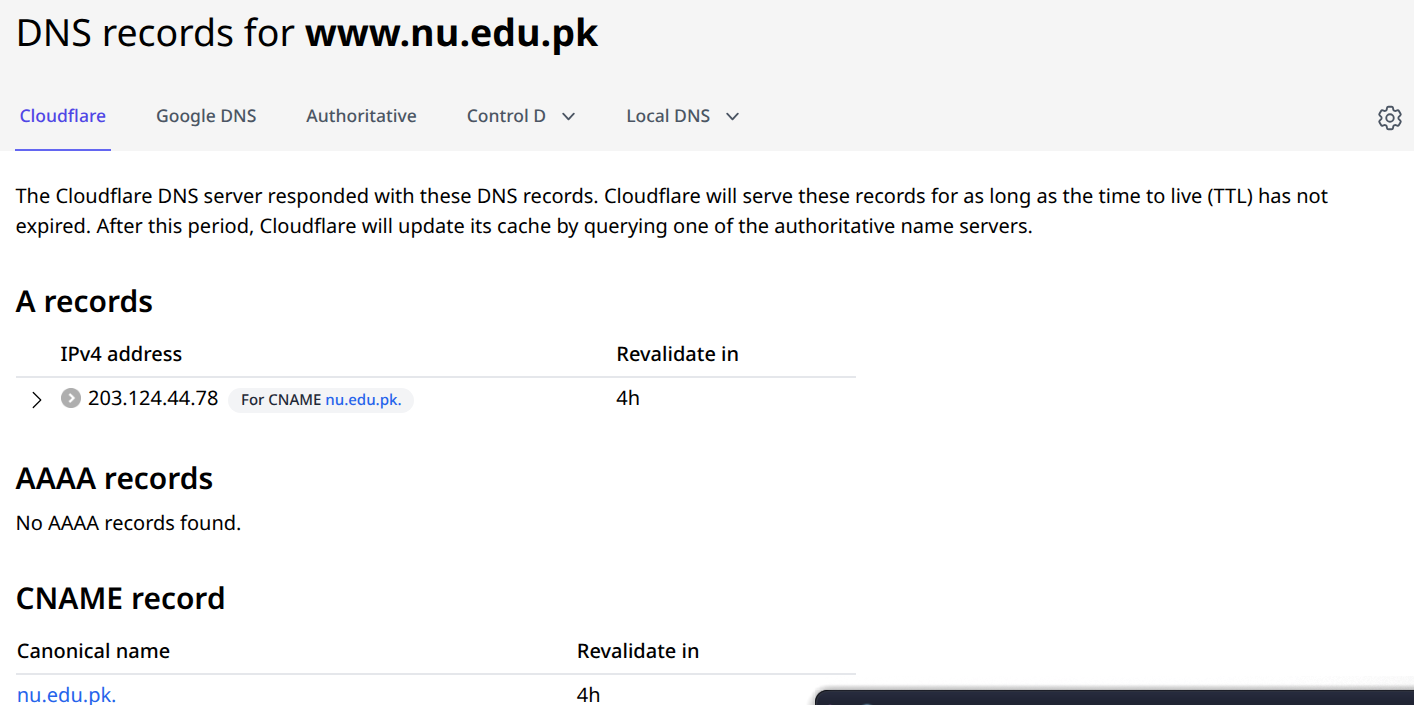
A Record (Address Record)
Maps the domain nu.edu.pk to an IPv4 address. How cool is that?!
Example:
nu.edu.pk → 203.124.44.78
So, when you visit this domain, your browser knows exactly where to go!"Hosted by Commission on Science and Technology" likely manages the server. That's some serious tech power!
Revalidate in 4h: DNS data will refresh after 4 hours (TTL – Time to Live). Stay fresh!
AAAA Record (IPv6)
Just like the A record but for IPv6 addresses. Tech evolution at its best!
Result: No AAAA record → This site doesn’t support IPv6. Oh well, maybe next time!
CNAME Record (Canonical Name)
Sets one domain as an alias for another. It's like giving a nickname to a friend!
Here it shows:
nu.edu.pk→nu.edu.pk
Just a DNS quirk — not a real redirect. Fun fact!
🔐 HTTP vs HTTPS — Why Encryption Matters
I learned how the browser communicates with the server through protocols like HTTP and HTTPS. This is super important for security
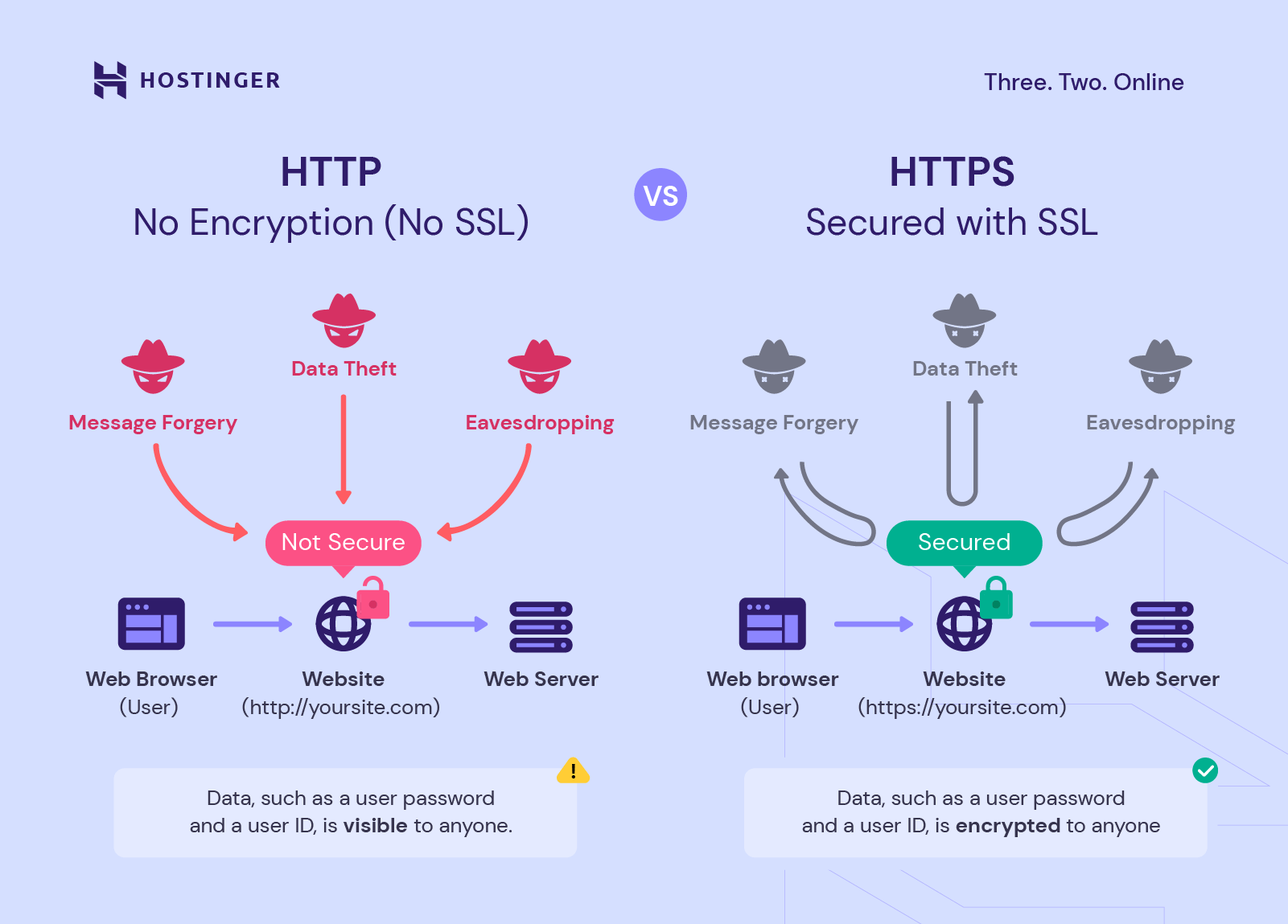
When building any web project, it's important to know the difference between HTTP and HTTPS, especially for keeping your users' data safe.
🚫 HTTP (No Encryption)
Sends data in plain text
Not secure — vulnerable to:
Eavesdropping – Attackers can silently intercept and read the data being transferred (like passwords or messages).
Message Forgery – The data being sent can be altered or faked by an attacker before it reaches the destination. Example: modifying login tokens or bank amounts.
Data Theft – Sensitive information like usernames, passwords, or credit card numbers can be stolen during transmission.
Example: [
http://example.comNot](http://example.comNot) safe for sensitive information. Avoid using it in production.
✅ HTTPS (Secure)
Uses SSL/TLS encryption to secure data
🔐 What is SSL/TLS?
SSL (Secure Sockets Layer) and TLS (Transport Layer Security) are encryption protocols used to secure data transferred between a user's browser and a website.
They make sure that:
Your data stays private (no one can read it)
our data isn’t changed during transmission
You're connected to the real website, not a fake one
SSL vs TLS — What’s the Difference?
SSL is the older version.
TLS is the newer, more secure version of SSL.
Today, when we say “SSL,” we usually mean TLS — most websites now use TLS even if they still call it SSL.
so https Keeps passwords, personal data, and transactions safe and private
Authenticates the server, ensuring users are talking to the real website
Example: [https://example.com
Safe](https://example.comSafe) and trusted — data is encrypted before being
DevTools: Inspecting Network Requests
To see what happens behind the scenes when a web page loads, I explored the Network tab in Chrome DevTools
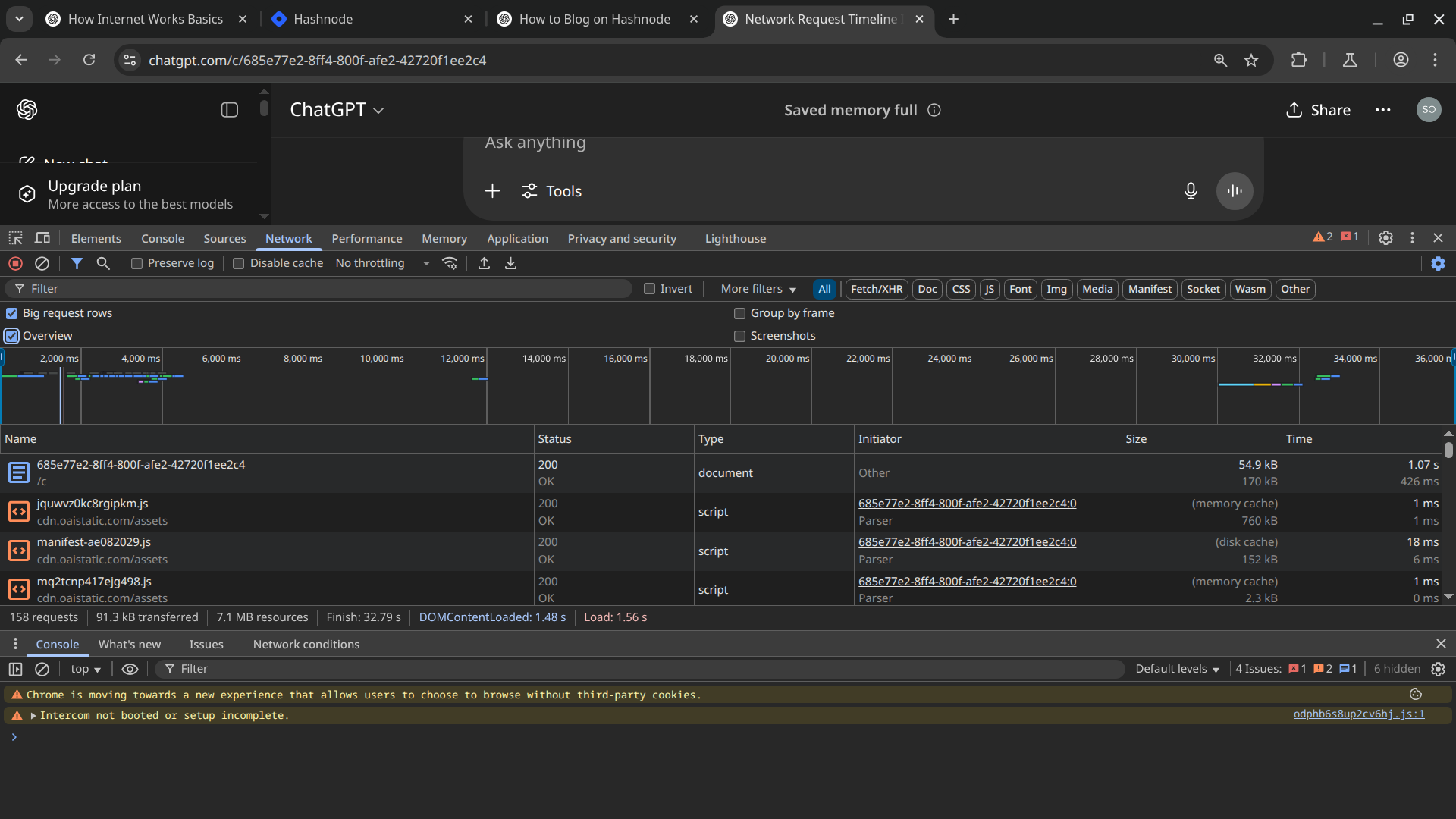
Here’s what I noticed:
The first file loaded is usually the main HTML document!
Then, JS/CSS assets load (some even from memory or disk cache)!
HTTP status codes like
200 OKconfirm successful responses!Timing info like:
DOMContentLoaded: 1.48s!Load: 1.56s!
These insights helped me visualize the full page load process with excitement!
Web Application Architecture
Once I understood browser–server communication, I looked into how real-world web apps are structured.
Main Components
Frontend — UI built with HTML, CSS, JavaScript
Backend — Handles logic, API routes, database queries
Database — Stores and manages user data (MongoDB, MySQL)
API — Connects frontend to backend
An API is like a waiter:
Takes your order (frontend request)
Sends it to the kitchen (backend)
Brings the food back (response)
[Browser] --HTML/CSS/JS--> [API Gateway] --JSON--> [Server] --> [Database]
This helped me realize that I’m not just learning to code — I’m learning how systems interact
Understanding APIs — The Bridge Between Frontend & Backend
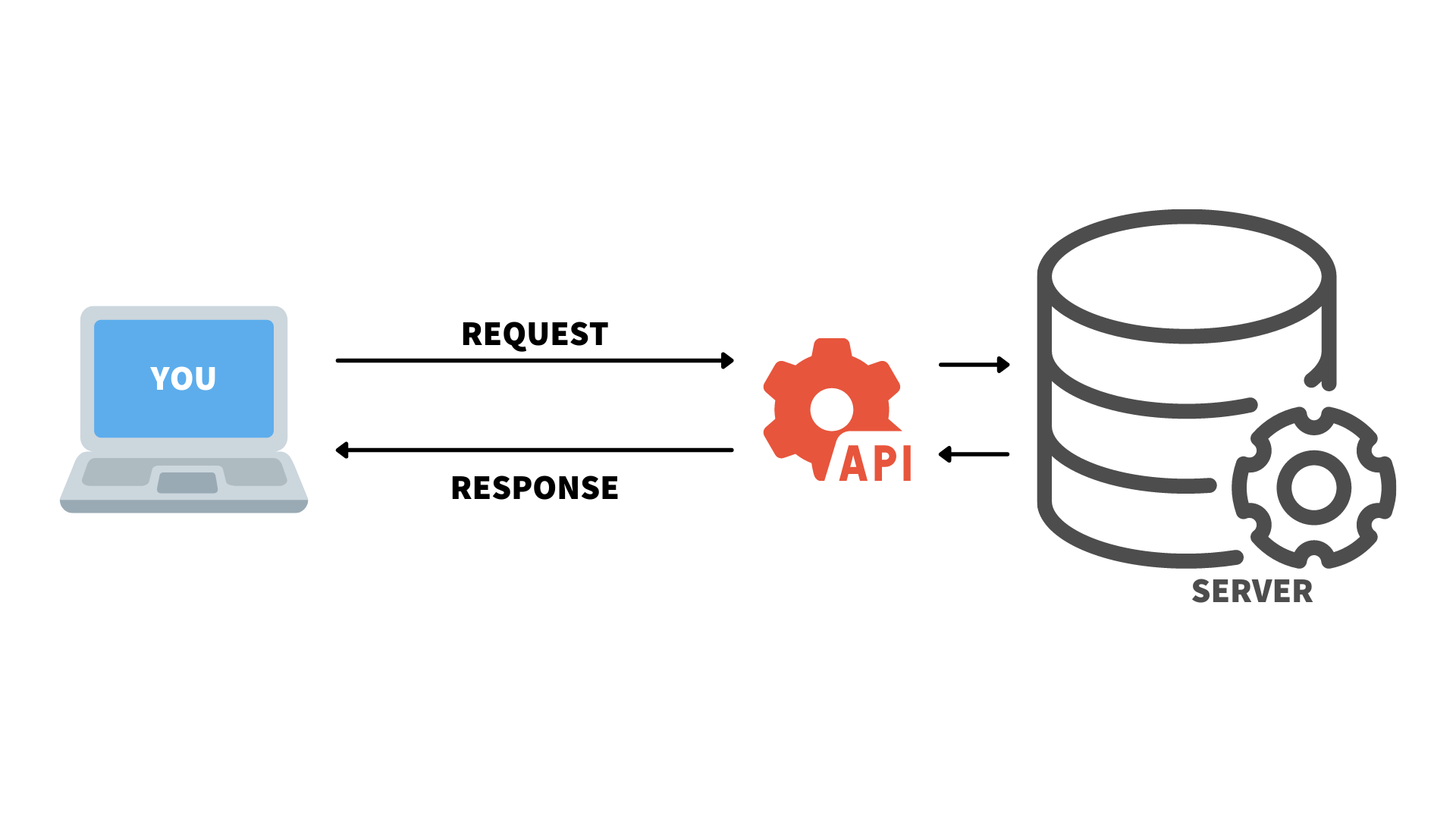
An API (Application Programming Interface) is how the frontend communicates with the backend without accessing the database directly.
Real life example":
Think of an API like a waiter at a restaurant:
You place your order
The waiter delivers it to the kitchen
The kitchen prepares the meal
The waiter brings it back to your table
In web terms:
Frontend sends a request → API processes it → Backend/database responds → API returns the data to frontend.
What’s Next? My Full Stack Learning Roadmap
| Step | Focus |
| 1 | Master JavaScript — logic, DOM manipulation, and interactivity |
| 2 | Learn MERN Stack — MongoDB, Express.js, React, Node.js |
| 3 | CI/CD & Deployment — Devops practices |
| 4 | AI/ML Integration — build intelligent features using Python, APIs, or ML models |
Each of these will become a blog post of its own.
Final Thoughts
Starting with the "how it works" approach instead of immediately diving into code gave me a better understanding of the full web ecosystem.
🚀 Don’t rush to write code. Learn how everything connects — it makes coding easier and more meaningful.
Now that I’ve explored how the web actually works — from DNS, IP addresses, and HTTP/HTTPS to APIs and browser-server communication — I finally feel confident about the foundation I’ve built. Understanding these core concepts has made me realize that web development isn’t just about writing code, it’s about knowing how everything connects behind the scenes
If you spot any mistakes, feel free to point them out — we’re all here to learn together! 😊
Fahad ALi
FAST-NUCES
BS Computer Science
🔗 LinkedIn:LinkedIn Profile
